FriendActivityGrid
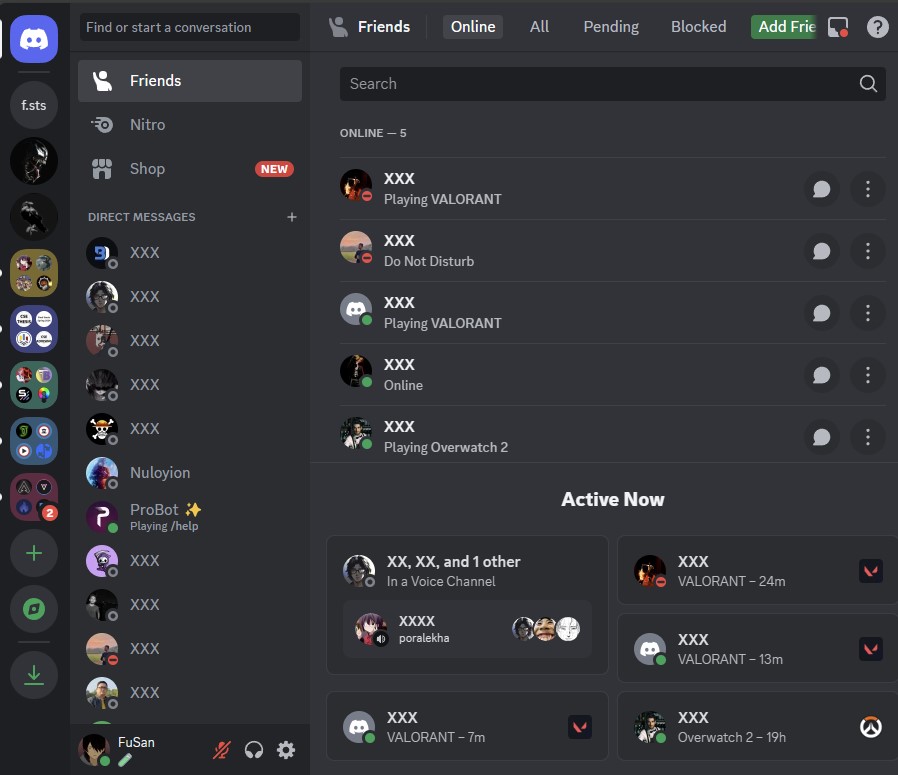
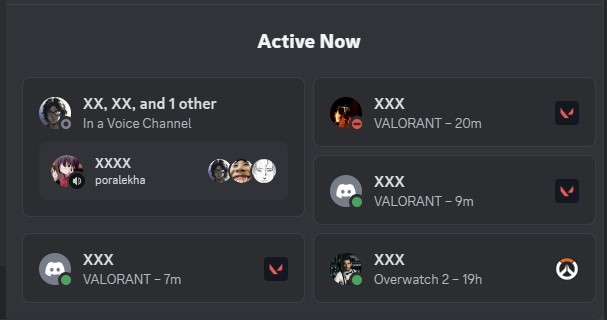
Friend Activity Grid
A theme for Discord that makes the friend activity grid visible on vertical monitor. By default, Discord hides the friend activity when width is below 1200px - this theme lets you choose between responsive mode (shows grid below 1200px) or always-on mode.
» Theme Preview ・ Report an issue ・ Join the support server
📥 Installation

BetterDiscord</b>
Save the file by right clicking and save link as from here. Copy it to this directory %appdata%/betterdiscord/themes or from Discord's Settings > Themes > Themes folder section

Replugged</b>
Click here and confirm the install in the client
Vencord</b>
Copy https://raw.githubusercontent.com/FuSan21/FriendActivityGrid/main/friend-activity-grid.theme.css into the box in Settings > Themes > Themes tab
## 🔧 Configuration The theme comes with two modes: - **Responsive Mode** (default): Shows grid layout when window width is below 1200px (instead of Discord's default behavior of hiding it) - **Always-On Mode**: Shows grid layout at all window sizes To switch between modes, edit the theme file and comment/uncomment the appropriate import lines. ## 🛠️ Development ### Prerequisites - Node.js >=20.0.0 - pnpm >=8.0.0 ### Building from source 1. Clone the repository ```bash git clone https://github.com/FuSan21/FriendActivityGrid.git cd FriendActivityGrid ``` 2. Install dependencies ```bash pnpm install ``` 3. Build the CSS files ```bash pnpm run build ``` This will generate two files in the `dist` directory: - `always.css`: Grid layout applied at all window sizes - `responsive.css`: Grid layout applied only below 1200px width ### Development commands - `pnpm run build` - Build CSS files - `pnpm run watch` - Watch for changes (Replugged) - `pnpm run bundle` - Bundle theme for distribution - `pnpm run lint` - Check code style - `pnpm run lint:fix` - Fix code style issues ## Credits for helping me with the theme Disease (gonorrhea2@discord)
Barnyard (huderon@discord)
Salternator, the \* selector(saltssaumure@discord)